Engraving Images Live in the Browser: Generative Line Art with SVG and WebGL
How a photo, ten SVG plates and a WebGL mountain range on my homepage are engraved line by line at runtime
Senior Full Stack Software Engineer. I architect production systems at scale, and write about orchestrating multi-agent AI systems, DevOps, and building my own products.
Creator of flutter_carplay (268+ stars) and Fleet (multi-agent CLI). Writing about what nobody else will: the real, unfiltered playbook of running autonomous AI systems in production.
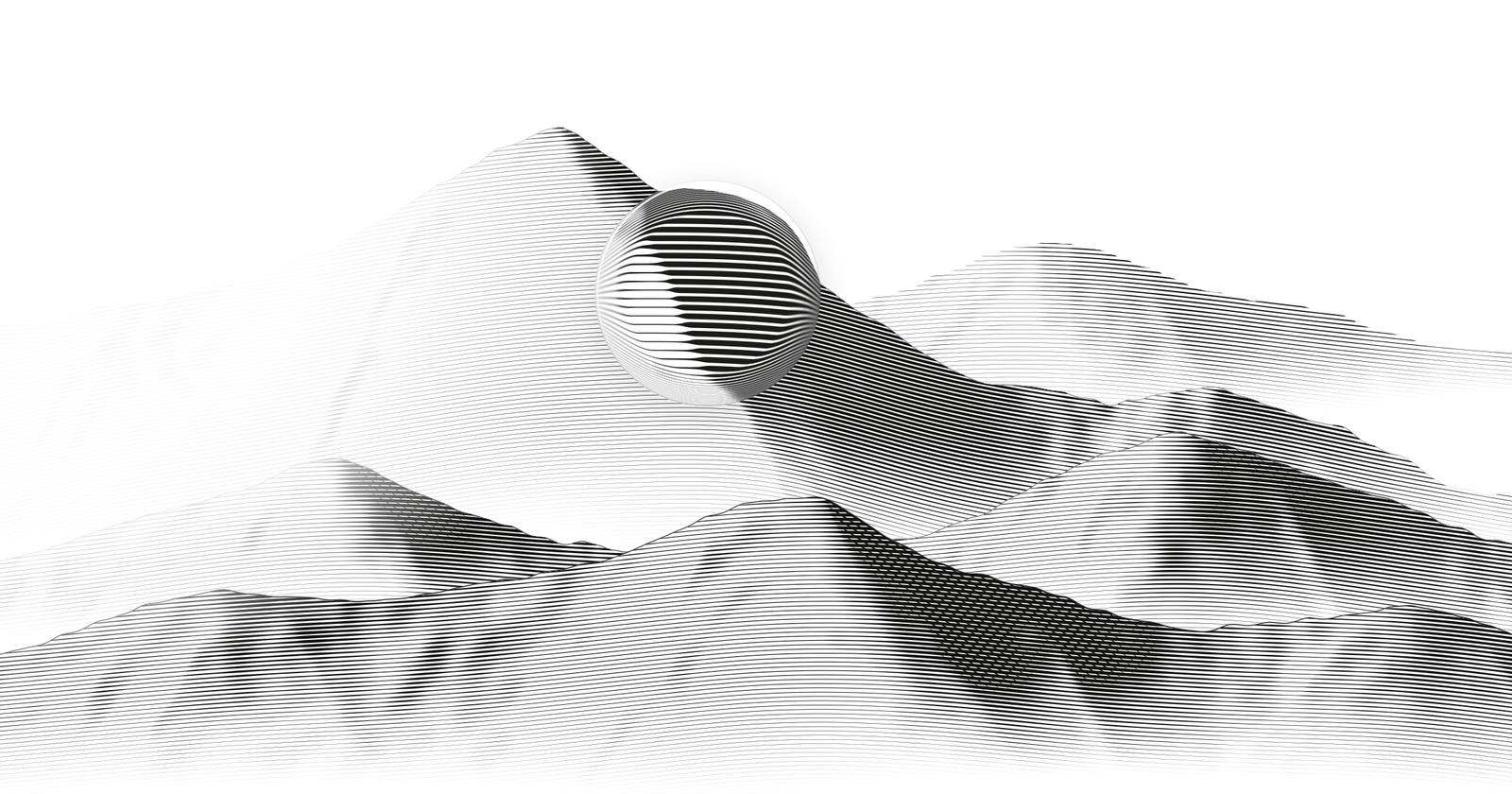
Every image on oguzhanatalay.com is an engraving, and none of them ships as an image file. The portrait, the mountain range behind it, the ten illustrated plates in the work section and the sea at the bottom of the page are computed in your browser when the page loads, from code, one photo and one small guide image.
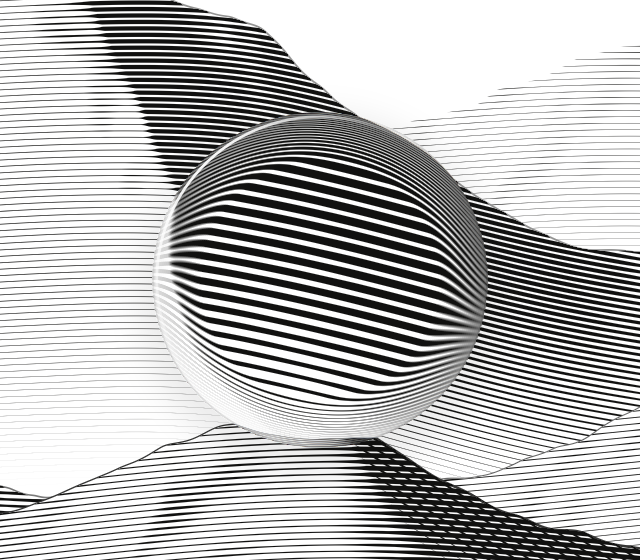
Open the page on a laptop and move the mouse over the mountains. A glass loupe follows the pointer and magnifies the lines without a single blurred pixel, because there are no pixels to magnify. The loupe asks the shader to engrave that spot again at twice the scale.
This post explains how it works: three engines, three rendering technologies, and one rule borrowed from banknote engravers.
The one rule: tone is line width
On an intaglio plate, the kind used to print banknotes and stamps, there is no grey ink. There is black ink, white paper and lines. A dark area is not darker ink. It is the same lines cut wider and deeper, and your eye averages the black and the white into a tone.
So every engine on the site reduces to the same mapping:
- Measure how dark a spot should be, from 0 (paper) to 1 (shadow).
- Draw the line through that spot wider in proportion.
- Never let neighbouring lines touch.
Point 3 is the one people miss. The portrait caps a line at 84 percent of the spacing between lines, the mountains at 74 percent. The white gap that survives in the deepest shadow is what keeps the image looking engraved instead of printed. Once lines merge, you have a halftone.
Everything else is choosing the right tool for each picture.
Engine 1: a photo engraved on Canvas 2D
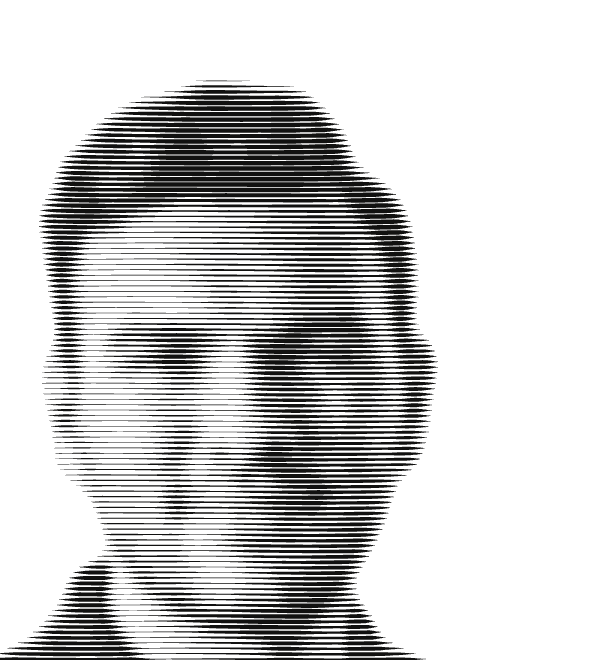
The portrait starts as an ordinary JPEG. The browser decodes it into an offscreen canvas, reads the pixels once and never draws the photo again.
Luminance first. Each pixel becomes one brightness value with the Rec. 709 weights, because green carries most of what we perceive as brightness:
const lum = (0.2126 * r + 0.7152 * g + 0.0722 * b) / 255;
Blur without a Gaussian. The engine needs blurred copies of that field: a light one that removes sensor noise and a soft one that describes the broad shape of the face. Three passes of a separable box blur approximate a Gaussian closely, and a box blur costs the same per pixel at any radius because it keeps a running sum.
Tone. Brightness goes through levels and a gentle gamma of 0.82, then gets local contrast added back: the difference between each pixel and the soft blur. That difference is what keeps an eyebrow readable when it sits on a shaded forehead. Ink is one minus tone, raised to the power 1.15, which keeps midtones slightly lighter than linear and lets shadows close in.
A guide image. A small companion PNG marks the subject in its red channel and the clothing in its blue channel. It does two jobs that a pure brightness mapping cannot:
- Inside the subject, ink never drops below 6 percent, so the brightest highlight on a cheek still carries a hairline. Without that floor, specular highlights punch white holes in the face and the likeness falls apart.
- On clothing, ink is capped so a black shirt cannot outweigh the face.
Rows. The canvas is divided into horizontal rows a few pixels apart. Along each row the engine samples roughly every half pixel and computes a half width:
// ink: 0 is bare paper, 1 is full shadow
const half = Math.min(0.42, ink * 0.46) * pitch;
Each row is stored as two polylines, its upper and lower edge, and filled as a closed polygon. Wherever a line gets thinner than about a tenth of a pixel, the polygon is split, so lines run out to nothing in the highlights instead of leaving slivers.
Volume. Each row is also lifted slightly by the soft brightness field, so over a bright cheekbone the lines bow upward by a fraction of the row spacing. You do not see the bend as a bend. You see roundness. Engravers get the same effect by cutting lines that follow the form.
The draw in. On load, every row sweeps from left to right like a burin crossing the plate. Rows start one after another from top to bottom across the first 55 percent of the animation, and each eases out on a quartic curve, so the portrait looks cut rather than faded in. With reduced motion turned on, the final frame is drawn directly.
Two production details matter. The canvas rebuilds at its layout size through a ResizeObserver, never at a transformed size, so an entrance animation never bakes a resampled engraving. And the device pixel ratio is capped at 2: beyond that the lines are already sharper than the eye can resolve, while the fill cost keeps growing.
Engine 2: SVG plates with lines that swell

The work section has ten illustrated plates, among them a survey map, a shopping cart, a bank, a city skyline and a sailing ship. Each is generated at runtime on a 400 by 300 plate and rendered as SVG, so it stays sharp at any size and reads as a labelled image to assistive technology.
Strokes are the wrong primitive. An SVG stroke has one width along its whole length. An engraved line swells and thins. So nothing on these plates is a stroke. Every line is a filled ribbon: for each point on the centreline, take the direction toward its neighbours, turn it a quarter turn to get the normal, and push the point out by half the local width on both sides. Walk the left edge forward and the right edge back, then close the path. Every ribbon is built with the same winding direction, so with the nonzero fill rule overlapping ribbons stay solid instead of cancelling each other out.
Lifting the burin. When the width falls to zero in the middle of a line, the ribbon splits into runs, and each run tapers to a sharp point at both ends. That is the mark a burin leaves when the engraver lifts it from the plate, and it is the difference between a drawing made of lines and an engraving.
Curves. Control points go through a Catmull Rom spline, and outlines get Chaikin corner cutting, which replaces every corner with two points a quarter of the way along each side. A few rounds turn a polygon into a smooth curve without a single curve command in the output.
Deterministic randomness. Hatching jitter, cloud edges and grain all come from a seeded generator, so every visitor sees the same plate on every load. Random looking, never random.
A hairline floor that follows the screen. The thinnest line on any plate must stay at least 0.55 CSS pixels wide on screen, whatever size the plate renders at. So line widths are expressed against a unit computed from the rendered scale:
// scale: rendered CSS pixels per plate unit
const u = Math.min(2.5, Math.max(0.25, 1 / scale));
const env = { u, min: MIN_PX * u }; // thinnest ribbon, in plate units
A plate shown small gets heavier hairlines in plate units, and a plate shown large gets finer ones. When the rendered scale drifts by more than about 8 percent, the plate rebuilds its geometry.
Small paths. A plate holds thousands of ribbons, and SVG path data is text. The encoder rounds coordinates to integers in twentieths of a plate unit, writes everything after the first point as relative line commands, and drops the separator whenever the next number carries its own sign. The DOM stays small enough that ten plates on one page cost nothing noticeable.
Motion. A plate moves only while you hover or focus it, and each has its own slow loop that takes five to ten seconds per cycle. All plates share one requestAnimationFrame loop, the frame delta is capped at 50 ms so a background tab never causes a jump, and each plate redraws at most 40 times a second. An IntersectionObserver marks offscreen plates so they cost nothing.
The part I care about most is the ending. When the pointer leaves, the plate does not freeze mid motion and does not snap back. A cubic Hermite curve carries it from its current phase and velocity forward to the next whole cycle, where the plate is at rest. It always moves forward and always lands on the composed pose.
Engine 3: a mountain range in one fragment shader
The hero needs thousands of lines that respond to light and to the pointer at full frame rate across the whole viewport. That is a job for the GPU. The entire hero is one WebGL draw call: a single triangle that covers the screen, and a fragment shader that decides for every pixel whether it is ink or paper.
Terrain from a table. The mountains are four depth layers, each composed of peaks described by a few numbers: centre, height, left and right width, how the spur drifts with depth and how round the summit is. Instead of sending these as uniform arrays, JavaScript generates the GLSL for each layer from the table at startup. Every value lands in the shader as a literal constant, so no uniform arrays are needed and the shader runs on plain WebGL 1.
A lit face model. Each layer gets a surface normal from its slope plus gradient noise for spurs and gullies. Tone is Lambert shading against a light that drifts slowly on periods of 54, 71 and 97 seconds, so the light never visibly loops.
Filter detail to the line pitch. This is the most important idea in the shader. Lines sit about 3 CSS pixels apart, and terrain detail smaller than a few line spacings cannot be expressed by lines. It can only alias into moiré. So each noise octave fades by its wavelength measured in line pitches, and octaves shorter than about six pitches disappear. The relief is exactly as fine as the engraving can carry, and no finer.
Lines as a periodic function. The line coordinate is the pixel height divided by the pitch, bent by the broad shape of each mountain so the lines curve over the form like contour hatching. The distance to the nearest line centre comes from fract. Coverage is an exact box filter: how much of a line of the current width falls inside this pixel's footprint, where the footprint comes from fwidth. That is analytic antialiasing with no multisampling.
When the footprint approaches the line spacing, as it does on distant layers, in small windows and under the loupe edge, the function blends toward the average ink of the whole line family instead of trying to resolve individual lines:
// c: exact coverage of the nearest lines under this pixel
// 2.0 * w: the mean ink of a line family with half width w
return mix(clamp(c, 0.0, 1.0), 2.0 * w, smoothstep(0.45, 0.9, aa));
That single line is why the hero does not shimmer while the light moves.
Swelling, tapering and crosshatching. Line width follows tone, capped at 74 percent of the pitch. Toward a crest, widths taper to zero, so lines end in points against the sky instead of stopping at a drawn outline. Only in the deepest shadow, where tone passes 0.68, a second family of lines appears at about 58 degrees with a slightly wider pitch, combined the way two passes of ink combine on paper. Crosshatch everywhere looks mechanical. Crosshatch only where the shade demands it looks cut by hand.
The loupe. On devices with a fine pointer, the loupe follows the cursor on a critically damped spring. Inside the lens the shader does not magnify a texture. It evaluates the whole scene again at coordinates pulled toward the lens centre:
// inside the lens, engrave the scene again closer to the centre
vec2 q = rn < 1.0 ? P + dir * s * R : p;
float ig = scene(q, fwq);
Here s is half the normalised radius across most of the lens, so the centre shows the plate at twice the scale, and the lines stay razor sharp because they are recomputed rather than resampled. In the outer 30 percent s ramps up to produce barrel refraction like a real lens edge. A faint desaturated fringe, an inner shadow at the lower right, a specular arc at the upper left and a barely visible drop shadow sell the glass. The footprint fwq is measured on the magnified coordinates, so the antialiasing stays exact inside the lens too.
Cheap when idle. A shader this size is not free, so the render loop works hard at doing nothing:
- The device pixel ratio is capped at 2.
- While the loupe moves, frame times are sampled. If more than half of 90 frames take longer than 26 ms, render resolution steps down, to a floor of 60 percent. After five seconds of fast frames it steps back up.
- When nothing is interacting, the scene redraws about nine times a second, which is enough for the slow light and the drifting mist.
- After two minutes without input the loop sleeps until a pointer, scroll or visibility change wakes it. Hidden tabs and offscreen canvases draw nothing.
The sea, and a graceful fallback
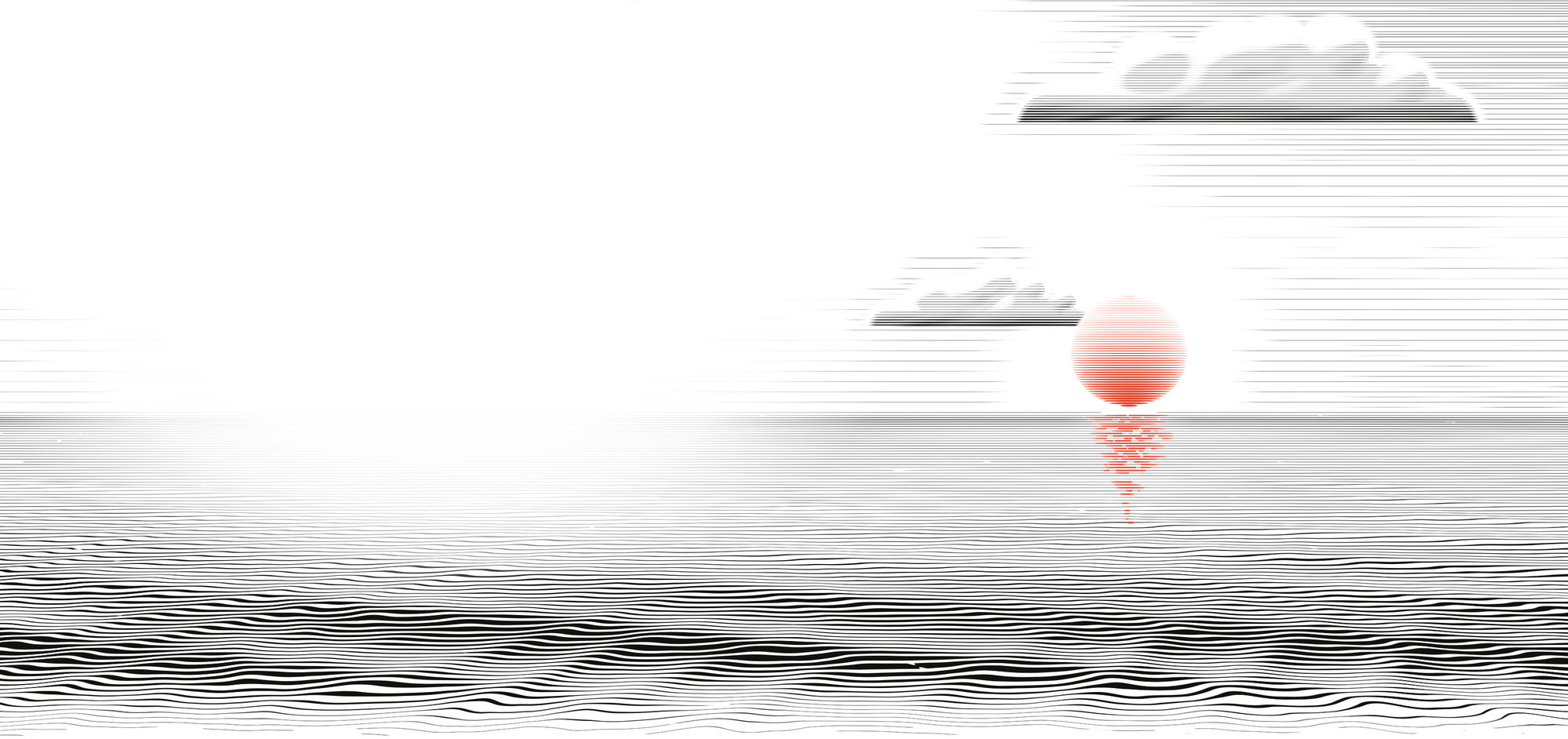
The contact section closes with a calm sea under a vermilion sun, engraved by a fourth engine on the same principles: horizontal lines that thicken toward the viewer, ripples that answer the pointer, and a sun cut from the line field in the page's single accent colour. It also carries a Canvas 2D renderer that draws a still frame when WebGL is unavailable. An engraving should degrade into a quieter engraving, not into an empty box.
Being a good citizen on a real page
Generative art on a portfolio competes with the content for CPU, battery and attention. Every engine follows the same rules:
- Reduced motion is respected. With the preference on, each engine renders a composed final frame and stays still.
- One pause switch. A single class on the root element stops every animation loop on the page.
- Late loading. The engines load after hydration through a dynamic import, and the plate definitions sit in their own chunk.
- Layout driven sizing. Canvases and plates measure their layout box and rebuild only when the size really changes.
- Out of the reader's way. The loupe hides over text and controls and appears only for fine pointers. On a touch screen the hero is simply an engraving.
What I would tell anyone building this
- Choose the line spacing first and derive everything from it, including how much detail the image is allowed to carry.
- Keep a white gap in the deepest shadow.
- Give highlights a hairline floor inside the subject.
- Antialias analytically, and fall back to average coverage when lines get too fine to resolve.
- Hold the thinnest line to a minimum in screen pixels, not in drawing units.
- Seed your randomness.
- Make the idle state cheap. Most of the time nobody is touching the page.
All of this runs live at oguzhanatalay.com. Open it on a laptop, move over the mountains, hover a plate in the work section and watch it come to rest, then scroll down to the sea. If you are building something that needs this kind of care in the browser, my email is at the bottom of that page.